
If your website traffic has plateaued — or your pages simply refuse to climb past a certain ranking position — Core Web Vitals might be the invisible wall holding you back. In 2026, Google has strengthened performance as a ranking signal significantly, and the sites that take it seriously are quietly pulling ahead of those still treating it as an afterthought.
This guide breaks down exactly what Core Web Vitals are in 2026, what changed, what the real-world benchmark scores look like, and — most importantly — how to fix LCP, CLS, and INP so your site performs better in Google Search, featured snippets, and AI Overviews.
What Are Core Web Vitals in 2026?
Core Web Vitals are a specific set of measurable, user-centric performance signals that Google uses to evaluate the real experience visitors have on your web pages. They are not theoretical benchmarks. They are based on real Chrome user data collected through the Chrome UX Report (CrUX) — field data from actual devices, actual connections, and actual users.
According to Google’s official Core Web Vitals documentation, the three active metrics in 2026 are:
1. Largest Contentful Paint (LCP) — measures loading performance. It tracks how long it takes for the largest visible element on your page (hero image, banner, or large text block) to fully render in the viewport. Good: under 2.5 seconds | Needs Improvement: 2.5s–4.0s | Poor: above 4.0s
2. Cumulative Layout Shift (CLS) — measures visual stability. It captures how much content unexpectedly moves or shifts while the page loads — the frustrating experience of tapping a link that suddenly jumps somewhere else. Good: under 0.1 | Needs Improvement: 0.1–0.25 | Poor: above 0.25
3. Interaction to Next Paint (INP) — measures responsiveness. INP replaced First Input Delay (FID) in March 2024. Unlike FID, which only measured the very first interaction, INP tracks every single interaction a user makes — clicks, taps, keyboard inputs — throughout the full session. Good: under 200ms | Needs Improvement: 200ms–500ms | Poor: above 500ms
An important 2026 update: Google has introduced the Visual Stability Index (VSI), a session-scoped companion metric measuring layout stability throughout the entire user session — not just the initial load. VSI weights layout shifts based on user intent, making it more sophisticated than CLS alone. Forward-thinking technical SEO professionals should begin monitoring VSI now.
To pass Core Web Vitals overall, at least 75% of real user visits must score “good” across all three metrics. This is the 75th percentile rule, and Google uses field data — not lab simulations — to enforce it.
Real-World Example: What a Passing Core Web Vitals Report Looks Like
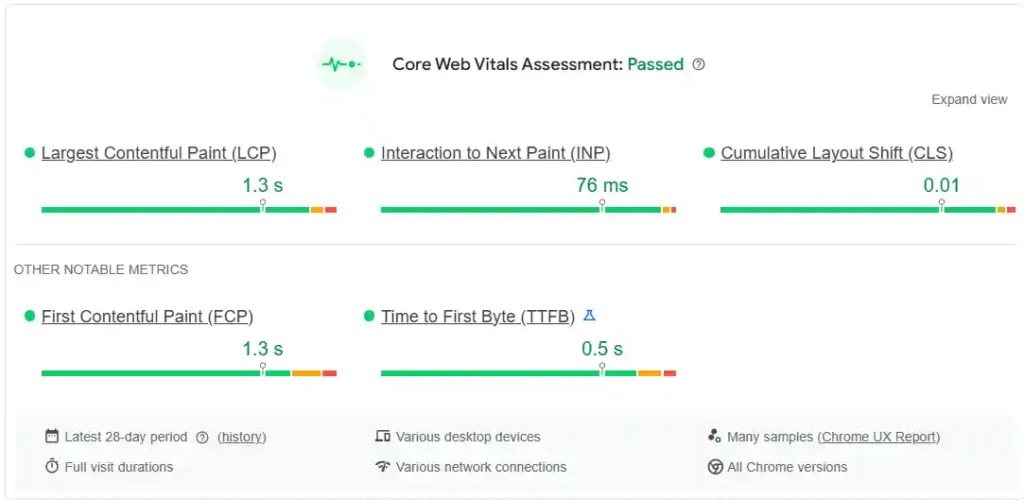
Here is what a fully optimized, real-world Core Web Vitals assessment looks like from PageSpeed Insights field data — based on 28 days of Chrome UX Report data across desktop devices:
Core Web Vitals Assessment: PASSED ✅
| Metric | Score | Status |
|---|---|---|
| Largest Contentful Paint (LCP) | 1.3 seconds | ✅ Good |
| Interaction to Next Paint (INP) | 76 ms | ✅ Good |
| Cumulative Layout Shift (CLS) | 0.01 | ✅ Good |
| First Contentful Paint (FCP) | 1.3 seconds | ✅ Good |
| Time to First Byte (TTFB) | 0.5 seconds | ✅ Good |
Every metric here is comfortably inside Google’s “good” thresholds — not just passing by a hair, but genuinely fast. Notice the TTFB of 0.5 seconds, which gives the LCP plenty of budget to land under 1.3 seconds. The INP of 76ms is nearly three times faster than Google’s 200ms threshold. And a CLS of 0.01 means virtually zero visual instability for users.
This is your target. This is what a well-optimized site looks like in practice — and it is 100% achievable for any site with the right technical approach.
Why FID Is Gone and INP Is the New Standard
Many articles — even published in 2025 — still discuss FID as an active Core Web Vital. It is not. Google officially retired First Input Delay on March 12, 2024, replacing it with INP.
Here is why this matters practically: FID measured only the delay before the browser began processing the very first user interaction. INP measures the delay for every interaction, from page load to the user closing the tab.
A site could have a perfect FID score of 40ms and still have a checkout form that takes 900ms to respond. Under FID, this was completely invisible. Under INP, it registers as a critical failure in your Google Search Console report.
If your site runs heavy JavaScript, uses multiple third-party scripts, or has complex event handlers — your INP score is likely suffering even if your old FID numbers looked excellent. Auditing INP should be the first thing on any technical SEO checklist in 2026. Speaking of which, for a comprehensive technical foundation, read the full Technical SEO Checklist 2026 on Toolify Worlds — it covers crawlability, indexation, structured data, and performance in one place.
Why Core Web Vitals Matter More Than Ever for SEO
Let’s be direct: Core Web Vitals alone will not push a weak, thin page to position one. Content quality, relevance, and authority still lead Google’s ranking hierarchy. But in 2026 — with AI-generated content flooding search results and hundreds of pages competing for every keyword — technical excellence has become the differentiator between pages that rank and pages that stagnate.
The data makes this concrete:
Pages at position one on Google show a 10% higher Core Web Vitals pass rate than pages at position nine. Pages loading under two seconds carry a 9% bounce rate. Pages taking five or more seconds spike to 38% bounce rates. A one-second delay in load time reduces conversions by 7% — meaning an e-commerce store generating $100,000 per month loses $84,000 in annual revenue from a single second of slowness.
With the March 2026 core update, Google strengthened the weight of performance signals in its algorithm. Currently only 47% of websites pass all Core Web Vitals thresholds. The remaining 53% are losing 8% to 35% of traffic and revenue without knowing it.
For AI Overview eligibility specifically, Core Web Vitals function as a quality filter. Google surfaces authoritative, fast, technically sound pages in AI Overviews — not slow, unstable ones, regardless of content quality. Fixing your Core Web Vitals is one of the highest-leverage moves you can make for both traditional rankings and emerging AI search formats.
How to Measure Your Core Web Vitals: The Right Tools
Before fixing anything, establish your baseline. These are the essential tools:
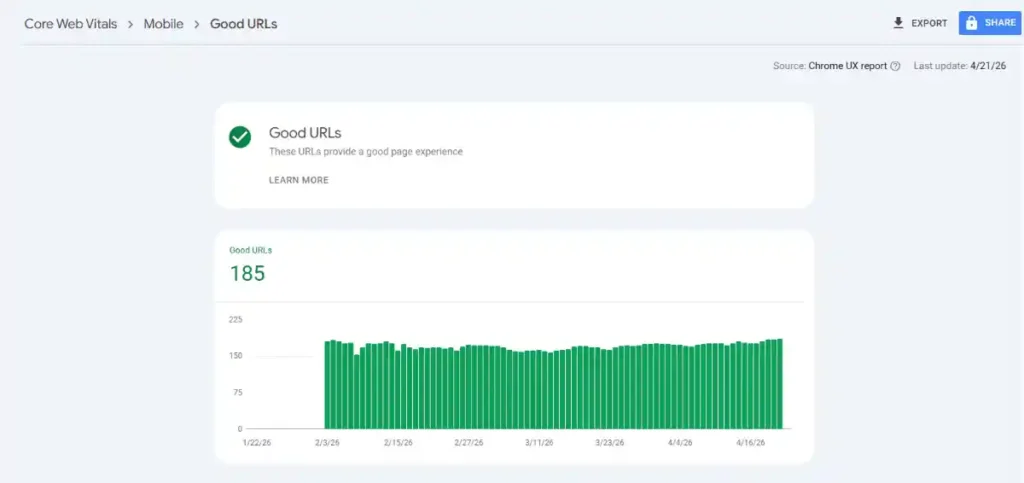
Google Search Console — Your primary source of truth. The Core Web Vitals report shows real field data from Chrome users, segmented by mobile and desktop. Pages are grouped as “Good,” “Needs Improvement,” or “Poor.” Data refreshes on a 28-day rolling window. Check this first. Access it at Google Search Console.
PageSpeed Insights — Available at pagespeed.web.dev, this tool combines field data from CrUX with lab data from Lighthouse. The Diagnostics section identifies specific issues per metric. Always check both mobile and desktop — they are usually dramatically different.
Chrome DevTools and Lighthouse — Use these in your browser for development testing. The Performance panel and Lighthouse audits identify long tasks affecting INP, render-blocking resources hurting LCP, and layout shift contributors for CLS.
Chrome UX Report (CrUX) — The public dataset behind GSC and PageSpeed Insights. Contains real performance data from opted-in Chrome users. This is the source of truth that Google’s ranking algorithm actually uses.
DebugBear — Provides continuous monitoring and alerts when metrics degrade after deployments.
One critical trap to avoid: a Lighthouse score of 95 in the lab does not mean your real users are having a good experience. Lighthouse simulates a powerful machine on a stable connection. Your actual visitors are on budget smartphones on mobile networks. Only field data — what you see in GSC — is what Google measures for rankings. Always prioritize field data over lab scores.
To check your on-page SEO signals alongside performance, use the free Meta Tag Analyzer and Heading Tags Checker on Toolify Worlds — both are free with no login required.
How to Fix Poor LCP Scores
LCP is the Core Web Vital that most websites struggle with most — and fixing it delivers the biggest visible impact. Here is a systematic, prioritized approach:
Optimize your images immediately. Unoptimized images are the leading cause of poor LCP scores. Convert all images to WebP or AVIF formats — both deliver dramatically smaller file sizes than JPEG or PNG without visible quality loss. Use responsive images with srcset attributes to serve appropriately sized files based on device. The Toolify Worlds Image Compressor tool lets you compress images without losing quality — use it before uploading any image to your site.
Never lazy-load your LCP image. This is one of the most counterintuitive but impactful fixes available. Lazy loading is excellent for below-the-fold images, but applying it to your hero image or banner — your LCP element — tells the browser to intentionally delay loading it. Instead, add fetchpriority=”high” to your LCP image element and add a preload link tag in your HTML head. This signals to the browser to prioritize loading it immediately.
Eliminate render-blocking resources. CSS and JavaScript files loaded before the page can render directly delay LCP. Inline your critical above-the-fold CSS directly in the HTML head so the browser can paint content immediately. Use async or defer attributes on all script tags. Move non-critical JavaScript to load after the main content.
Improve Time to First Byte (TTFB). As seen in the real example above, a TTFB of 0.5 seconds is ideal — it leaves the full LCP budget available for content rendering. If your server takes 1.5 seconds just to respond, your LCP will almost certainly be poor regardless of other optimizations. Upgrade to faster hosting infrastructure, implement server-side caching, and deploy a Content Delivery Network (CDN) like Cloudflare, AWS CloudFront, Akamai, or Vercel Edge Network. For image-specific CDN benefits, read Best Image Size for Website Speed and SEO 2026 on Toolify Worlds.
Use a CDN for global audiences. CDNs serve your assets from the server geographically closest to each visitor. For any Pakistani website serving a global audience, or any business targeting multiple regions, a CDN is not optional — it is foundational to achieving good LCP at the 75th percentile across all users.
How to Fix High CLS Scores
CLS is often the sneakiest problem because layout shifts happen during loading — and developers testing on fast connections with already-cached resources rarely notice them. Your real users do.
Set explicit dimensions on all images and videos. If your HTML does not define width and height for media elements, the browser does not know how much space to reserve. When the image eventually loads, it pushes all content below it downward — creating a measurable layout shift. Adding width and height attributes or CSS aspect-ratio declarations is the single fastest CLS fix available and costs nothing to implement.
Fix font-induced layout shifts. Web fonts often cause a “flash of unstyled text” (FOUT) — system fonts appear first, then swap to the custom font, shifting the layout. Use font-display: swap in your CSS, preload your critical font files, and apply font-metric overrides (ascent-override, descent-override) to minimize the visual jump when fonts swap in.
Reserve space for ads and embeds. Ad units that dynamically inject content without pre-reserved containers are one of the biggest CLS culprits on monetized sites. Reserve a fixed-height container for every ad slot before the ad loads. Several major ad networks now offer low-CLS ad units specifically because of Core Web Vitals requirements — ask your network about them.
Handle dynamically injected content carefully. Cookie consent banners, live chat widgets, newsletter pop-ups, and sticky headers that inject above existing content all generate layout shifts. Ensure these elements are absolutely positioned, use reserved space, or appear before other content renders so they do not displace elements users are already reading.
How to Fix Poor INP Scores
INP is technically the hardest Core Web Vital to fix because it requires architectural JavaScript decisions — not just file-level changes. But the impact on user experience is enormous.
Audit every third-party script on your site. On average, third-party scripts account for 57% of JavaScript execution time on commercial websites. Analytics platforms, advertising pixels, heatmap tools, A/B testing scripts, social media embeds, and live chat widgets all compete for the browser’s main thread. Identify every third-party script. Defer or asynchronously load any that are not critical to the immediate user experience. Consider loading them only after user interaction or after the page finishes loading.
Break up long tasks. The browser’s main thread can only process one thing at a time. Any JavaScript task exceeding 50ms blocks the main thread and prevents it from responding to user interactions — directly worsening INP. Use code splitting to break your JavaScript into smaller, asynchronously loaded chunks. Tools like Webpack, Rollup, and Vite all support code splitting natively.
Use Web Workers for heavy computation. If your page runs complex calculations, 3D rendering, particle systems, or large data processing, offload that work to Web Workers running in a separate thread. This keeps the main thread completely free to respond to user interactions with near-instant responsiveness — exactly the kind of 76ms INP score shown in the real benchmark above.
Optimize your event handlers. Poorly written click or input handlers that trigger expensive DOM operations, forced layout reflows, or synchronous network requests directly hurt INP. Review your event handlers and defer or batch any non-critical work they initiate. Progressive loading — loading heavy interactions after critical content renders — is a proven architecture for combining rich interactivity with excellent INP scores.
Core Web Vitals for WordPress, Shopify, and E-commerce Sites
WordPress — The platform has matured significantly for performance. Use a performance-focused theme and avoid heavy page builders that inject excessive CSS and JavaScript. Implement a caching plugin such as WP Rocket or LiteSpeed Cache. Use an image optimization plugin that auto-converts to WebP. Configure your CDN through Cloudflare. For a deep technical walkthrough of what crawl and indexation issues can silently kill your rankings alongside performance problems, read Robots.txt Mistakes That Kill Rankings in 2026 on Toolify Worlds.
Shopify — Shopify handles hosting and CDN infrastructure, giving stores a solid performance foundation. The biggest Core Web Vitals issues on Shopify come from third-party app bloat and theme inefficiency. Audit every installed app. Remove any that are not generating measurable revenue. Choose lightweight, performance-optimized themes with minimal render-blocking scripts.
WooCommerce — Similar to WordPress but with additional database overhead from product catalog queries. Focus on caching, database optimization, and a strong CDN. Server-side rendering significantly outperforms client-side rendering for LCP on product pages.
React and Next.js — Client-side rendering in React delays LCP because the browser must download, parse, and execute JavaScript before any content appears. Use Next.js with server-side rendering (SSR) or static site generation (SSG) to ensure content is present in the initial HTML response. Use next/image for automatic image optimization, responsive sizing, and correct LCP priority handling. Offload complex interactions to Web Workers to protect INP scores.
For image conversion and optimization before deployment on any platform, the free Image Converter tool on Toolify Worlds handles WebP conversion quickly — no login required.
Core Web Vitals and AI Overview Eligibility
Most SEO guides still are not talking about this connection — but it matters enormously in 2026.
Google’s AI Overview system selects content from pages that demonstrate strong EEAT signals (Experience, Expertise, Authoritativeness, Trustworthiness). Technical quality signals — including Core Web Vitals — act as an eligibility filter. A page with excellent content but poor technical performance is less likely to be surfaced in AI Overviews because Google evaluates overall quality holistically, not just content in isolation.
Fast-loading pages also produce better crawl efficiency. Googlebot can crawl and index content from fast, stable pages more completely and more frequently — directly feeding into AI Overview training, citation pools, and featured snippet selection.
To maximize AI Overview visibility alongside Core Web Vitals optimization, structure your content with proper FAQ schema. Toolify Worlds offers a free FAQ Schema Generator that formats your Q&A content in structured data Google’s AI systems can extract and cite directly. Also read FAQ Schema: Importance and How to Create It for implementation guidance.
Additionally, how Google reads meta tags in 2026 has shifted with AI search — your meta descriptions and title tags are now part of how AI systems interpret page intent. Keep them optimized alongside your performance work. Use the free Meta Tags Generator on Toolify Worlds to create SEO-optimized meta tags for every page.
Tools and Monitoring: Staying on Top of Core Web Vitals Long-Term
Core Web Vitals are not a one-time fix. They are an ongoing maintenance commitment. Here is a sustainable monitoring strategy:
Set up Google Search Console alerts for when pages shift from “Good” to “Needs Improvement.” Review your GSC Core Web Vitals report every 30 days — it reflects a 28-day rolling window, so monthly reviews give you clean, non-overlapping snapshots.
After every major site update, theme change, plugin addition, or new third-party script integration — re-test using PageSpeed Insights immediately. Many Core Web Vitals regressions are introduced during deployments and go unnoticed for weeks.
Prioritize your highest-traffic, highest-conversion pages first rather than attempting to fix every URL simultaneously. The pages generating the most revenue deserve the first performance investment.
For continuous free SEO health checks, use Toolify Worlds’ SEO Score Checker and Domain Authority Checker — both free tools that complement your Core Web Vitals work with broader technical and authority insights.
Core Web Vitals Business Impact: Numbers That Matter
The business case for Core Web Vitals optimization is backed by real enterprise-level case studies:
Amazon measured that every additional 100ms of latency cost them 1% in sales — making page speed a direct revenue variable, not a technical nicety. Agrofy, a Latin American agriculture marketplace, improved LCP by 70%, which correlated with a 76% drop in load abandonment — abandonment rates falling from 3.8% to 0.9%. The Economic Times improved CLS by 250% and LCP by 80%, resulting in a 43% overall reduction in bounce rates. Yahoo Japan improved CLS and saw 15.1% more page views per session, 13.3% longer session duration, and a 1.72% lower bounce rate. E-commerce sites achieving “good” thresholds across all three Core Web Vitals consistently report 15% to 30% conversion rate improvements.
These results come from organizations with massive traffic and engineering resources — but the optimization techniques are the same for any website. The opportunity exists for every business willing to implement them correctly.
Frequently Asked Questions About Core Web Vitals 2026
What are Core Web Vitals in 2026? Core Web Vitals are three Google-defined metrics measuring real user experience: LCP (loading speed, good under 2.5s), INP (interactivity, good under 200ms), and CLS (visual stability, good under 0.1). A fourth emerging metric, VSI (Visual Stability Index), measures session-wide layout stability. All three primary metrics must pass at the 75th percentile of real user data for a page to achieve an overall “good” Core Web Vitals assessment.
Did Google replace FID with INP? Yes. Google officially replaced First Input Delay (FID) with Interaction to Next Paint (INP) in March 2024. INP measures responsiveness across all user interactions throughout the session, making it a far stricter and more comprehensive metric than FID, which only measured the browser’s response delay to the very first interaction.
What is a good LCP score for SEO? A good LCP score is under 2.5 seconds. The ideal benchmark — as seen in real optimized sites — is under 1.5 seconds. Scores between 2.5s and 4.0s need improvement. Anything above 4.0 seconds is considered poor and will negatively impact rankings in competitive search results.
How do Core Web Vitals affect Google rankings? Core Web Vitals are a confirmed Google ranking signal incorporated since June 2021. While content quality and authority take precedence, Core Web Vitals act as a tiebreaker when multiple pages compete for the same keyword with similar content. Poor scores prevent great content from reaching its full ranking potential. With the March 2026 core update, their weight has increased further.
What is the 75th percentile rule in Core Web Vitals? Google requires that at least 75% of real user visits to a page must register “good” scores for LCP, INP, and CLS before that page achieves an overall “good” Core Web Vitals assessment. This p75 threshold is based on CrUX field data — not lab simulations — and is what Google Search Console reports.
How long does it take to see ranking improvements after fixing Core Web Vitals? Google Search Console data reflects a 28-day rolling window, so expect to see metric improvements in GSC approximately 4 to 6 weeks after implementing fixes. Ranking improvements typically become visible 2 to 3 months after sustained good scores — provided other SEO signals remain strong.
Does Core Web Vitals matter more on mobile or desktop? Mobile Core Web Vitals are more critical because Google uses mobile-first indexing — its primary crawling and ranking uses the mobile version of pages. Always optimize mobile performance first, then ensure desktop meets thresholds as well.
How does lazy loading hurt LCP? When the lazy loading attribute is applied to your LCP element — typically the hero image — the browser intentionally delays loading it to save bandwidth. This directly worsens your LCP score. The LCP element must always load with high priority using fetchpriority=”high” and a preload tag, never with lazy loading.
What percentage of websites pass Core Web Vitals in 2026? Only approximately 47% of websites currently pass Google’s “good” thresholds across all three Core Web Vitals metrics. This means the majority of your competitors are losing traffic and conversions due to poor performance — a significant competitive opportunity for sites that optimize correctly.
Does AMP help Core Web Vitals in 2026? No. AMP no longer provides ranking advantages in 2026. Well-optimized standard HTML can achieve identical or better Core Web Vitals scores — including LCP under 1.3s and INP under 80ms — without AMP’s restrictions and maintenance overhead.
Conclusion: Your Core Web Vitals Action Plan for 2026
Core Web Vitals are no longer a checkbox item for technical SEOs — they are a competitive necessity. With only 47% of websites currently passing all three thresholds, fixing your LCP, CLS, and INP puts you ahead of the majority of your competitors before you even consider content improvements.
Your action plan is clear:
Start by measuring — use Google Search Console and PageSpeed Insights to identify your worst-performing pages. Target the real-world benchmarks shown in this article: LCP under 1.3s, INP under 80ms, CLS under 0.02, FCP under 1.3s, and TTFB under 0.5s. Fix LCP first by compressing images to WebP using the Toolify Worlds Image Compressor, preloading your hero image, and improving TTFB with a CDN. Fix CLS by setting explicit image dimensions and reserving space for dynamic content. Fix INP by auditing third-party scripts, implementing code splitting, and optimizing JavaScript event handlers.
Maintain your gains by monitoring GSC monthly, re-testing after every deployment, and keeping your on-page SEO signals clean with the free tools available at Toolify Worlds — the Meta Tags Generator, Heading Tags Checker, SEO Score Checker, FAQ Schema Generator, and Image Converter are all available free with no login required.
Your rankings are waiting. Your users deserve a faster, more stable experience. Start fixing your Core Web Vitals today — and use the Technical SEO Checklist 2026 on Toolify Worlds as your roadmap to making sure nothing else is holding your site back.
Explore Free SEO and AI Tools at Toolify Worlds — No Login Required → toolifyworlds.com/tools/






