
If you have ever stared at your WordPress SEO plugin and wondered whether to tick “noindex” or add a “nofollow” attribute to a link, you are not alone. These two directives confuse even experienced website owners. They sound similar, they live in the same technical neighbourhood, but they do completely different jobs. Using the wrong one can quietly damage your search visibility without you even realising it. This guide breaks everything down in plain English so you can make the right call every single time.
What Is the Noindex Tag in SEO?
The noindex tag is a page-level SEO signal that tells search engines like Google not to include a specific page in their index. When Googlebot crawls a page and finds a noindex directive, it processes the instruction and removes that URL from search results — or never adds it in the first place.
You add it inside the HTML <head> section of a page like this:
<meta name="robots" content="noindex">
You can also deliver the same instruction through an HTTP header called X-Robots-Tag, which is especially useful for PDFs and non-HTML files where you cannot place a meta tag directly in the source code.
According to Google Search Central documentation, the noindex directive is one of the most reliable ways to control page visibility in Google search. When Google respects it (and it almost always does), the page disappears from search results entirely — but the page itself still exists, and Googlebot can still crawl it.
That last part catches people out. Noindex does not block crawling. It only blocks indexing. If you want to stop Googlebot from visiting a URL at all, that is a job for robots.txt. But more on that comparison later.
What Is the Nofollow Attribute in SEO?
The nofollow attribute works at the link level, not the page level. It is placed inside an anchor tag to tell search engines not to pass link equity — commonly called link juice — through that specific hyperlink.
It looks like this in HTML:
<a href="https://example.com" rel="nofollow">Anchor Text</a>
Originally introduced by Google in 2005 to fight comment spam, nofollow has evolved significantly. In 2019, Google introduced two additional link attributes alongside it:
- rel=”sponsored” — for paid links, advertisements, and affiliate links
- rel=”ugc” — for user-generated content like forum posts and blog comments
All three tell Google not to treat the link as an editorial endorsement. Google now treats these as hints rather than hard directives when it comes to crawling, meaning Googlebot may still follow a nofollow link — it just will not count it as a vote of confidence.
So when someone asks “does nofollow prevent crawling?” the honest answer is: not necessarily. It may reduce the likelihood of Googlebot following that path, but it does not guarantee it.
Noindex vs Nofollow: The Core Difference Explained
Here is the simplest way to think about it:
- Noindex controls whether a page appears in search results
- Nofollow controls whether a link passes authority to another page
They operate on completely different levels. One is about page visibility. The other is about link relationship attributes and PageRank flow through your site architecture.
Think of your website like a city. Noindex is like keeping a building off the official city map — it exists, people can visit it, but it does not show up on the public directory. Nofollow is like putting a “this road does not count for traffic statistics” sign on a specific street — the road exists, cars can use it, but it does not influence the official traffic data.
You can use them independently or together. <meta name="robots" content="noindex, nofollow"> tells Google: do not index this page AND do not follow any links on it. This is a strong combination used on pages like admin panels, login screens, or internal dashboards.
When Should You Use Noindex?
Knowing when to apply the noindex tag is one of the most important technical SEO skills you can develop. Here are the most common and appropriate use cases:
Thin Content Pages
If a page has very little original content — think auto-generated tag archives, thin category pages with only two products, or boilerplate legal text duplicated across multiple URLs — noindexing it prevents that content from diluting your overall site quality score in Google’s eyes.
Duplicate Content Issues
When you have multiple versions of the same content (printer-friendly pages, session ID URLs, parameter-based duplicates), noindexing the duplicate versions while keeping the original indexed is a solid strategy. Though canonical tags are often preferred, noindex gives you a harder instruction.
Thank You and Confirmation Pages
Pages that appear after a form submission or purchase have no search value. Noindexing them keeps your index clean and prevents people from landing on a “thank you for your order” page through Google.
Internal Search Results Pages
Your site’s internal search results are essentially duplicate and thin content. Noindexing them is a standard technical SEO best practice in 2026.
Staging and Development Pages
If you are building or testing new pages, you absolutely should noindex them. This prevents unfinished content from appearing in search results while you work.
Paginated Pages Beyond Page Two
For large blogs or e-commerce catalogues, pages 3, 4, 5 and beyond often have very low traffic value. Many SEOs choose to noindex these to consolidate crawl budget toward the most important pages.
Should you noindex category pages? It depends. If your category pages are thin and have no unique content, yes. But if they have good descriptions, filters, and strong internal linking, they can rank well and should stay indexed.
When Should You Use Nofollow?
Nofollow is about managing how link equity flows from your pages to others — both internal and external destinations.
Paid and Sponsored Links
Any link you have received payment for — including affiliate links, sponsored posts, and advertising placements — must use rel="sponsored" or at minimum rel="nofollow". Passing PageRank through paid links violates Google’s guidelines and can result in a manual penalty.
User-Generated Content
If your website allows comments, forum posts, or user profile pages, add rel="ugc" to links within that content. You did not editorially vouch for those links, and nofollow or ugc signals protect you from being associated with spam.
Untrusted or Low-Quality External Sources
If you need to reference a source you do not fully trust or do not want to endorse, use nofollow. You are essentially saying: “I am linking here for reference, but I am not vouching for this site.”
Login and Registration Links
When linking to login pages, member dashboards, or areas that do not add SEO value, using nofollow ensures you are not wasting crawl budget or leaking link juice to pages that do not need it.
When to Use Nofollow on Internal Links
This is more nuanced. Most SEO experts advise against using nofollow on internal links because it can disrupt your site’s natural PageRank flow. However, in specific cases — like linking to a noindexed page from a high-authority page — it may make sense. Use it sparingly on internal links and always with intention.
Noindex vs Robots.txt: Which One Should You Use?
This is one of the most commonly misunderstood comparisons in technical SEO. Both control what Google does with your pages, but they work very differently.
Robots.txt tells Googlebot not to crawl a page. If a URL is disallowed in robots.txt, Googlebot will not visit it. But here is the catch: Google can still index a page it has never crawled if other websites link to it. It will show up in search results as a URL-only result with no description — which is often worse than just letting it be indexed normally.
Noindex tells Google not to include the page in its index. But for noindex to work, Google must be able to crawl the page first. If you block a page with robots.txt, Google cannot see the noindex tag, so it may still get indexed from external links.
The practical rule:
- Use robots.txt to save crawl budget on pages you genuinely do not want Googlebot touching (like internal APIs, admin areas with authentication)
- Use noindex when you want to control indexation but still allow crawling
Never use robots.txt to block pages you want to control with noindex — they will conflict and you will get unpredictable results.
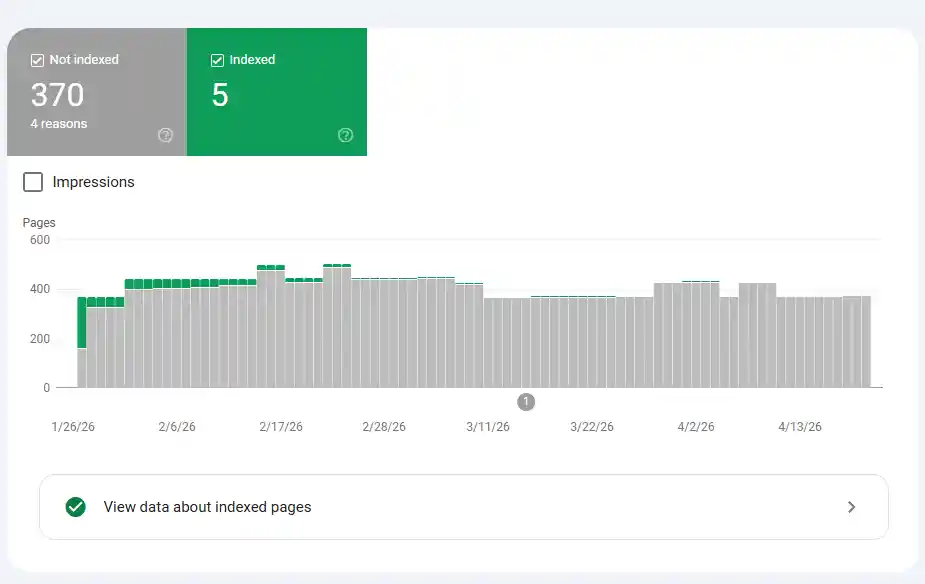
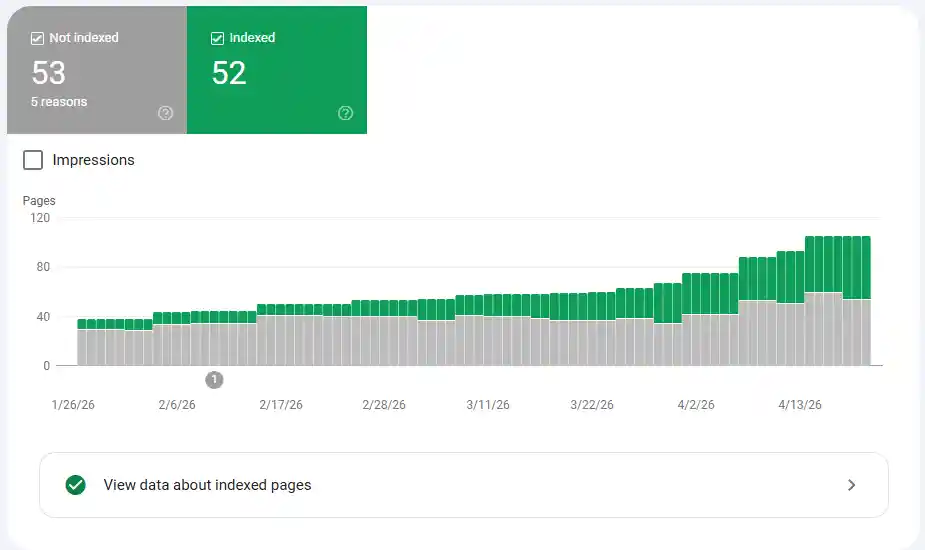
You can check index coverage and identify noindex issues directly inside Google Search Console under the Page Indexing Report, which gives you a breakdown of why specific pages are or are not indexed.
For a complete deep dive into robots.txt configuration, check out this guide on creating robots.txt for SEO and learn how to avoid the robots.txt mistakes that kill rankings.
Canonical Tag vs Noindex: When to Choose Which
Another comparison that causes confusion. Both solve duplicate content problems, but in different ways.
A canonical tag tells Google: “This is the preferred version of this content. Consolidate all signals here.” The duplicate page can still be indexed, but Google should treat the canonical URL as the authoritative one.
Noindex says: “Do not include this page in search results at all.”
Use canonical when you want duplicate pages to pass their authority to the main version. Use noindex when you want the duplicate page out of the index entirely and you are not concerned about passing signals.
If you are running an e-commerce store with faceted navigation — filters for size, colour, price — canonical tags are usually the better choice for keeping the category structure intact while avoiding index bloat. Noindex is better for generated URLs that serve no real user purpose at all.
Can You Use Noindex and Nofollow Together?
Yes, absolutely. The combined tag <meta name="robots" content="noindex, nofollow"> is a powerful directive that tells Google:
- Do not index this page
- Do not follow or pass authority through any links on this page
This combination is ideal for:
- Admin dashboards
- Login and account pages
- Internal utility pages
- Checkout and payment pages
- Any page with sensitive or private content
However, use it deliberately. Applying nofollow on a noindexed page is redundant in most cases since Google will not be sending users to that page anyway — but it does further reduce the chance of crawl budget being spent on links within that page.
How to Add Noindex Tags in WordPress
If you are using a popular SEO plugin, adding noindex is straightforward:
Using Yoast SEO: Go to the post or page editor, scroll to the Yoast SEO panel, click “Advanced,” and set the “Allow search engines to show this Post in search results?” option to “No.”
Using Rank Math: Open the Rank Math panel in the editor, go to “Advanced,” and toggle the “Robots Meta” to add noindex.
Manually in HTML: Add <meta name="robots" content="noindex"> between the <head> tags of your page template.
You can verify your implementation using Google Search Console. After applying noindex, submit the URL for inspection and check whether Google acknowledges the directive. It can take a few days to a few weeks for indexed pages to drop out of search results after noindex is applied.
If you want to check your overall technical setup and ensure all your meta tags are correctly configured, the free Meta Tag Analyzer tool at Toolify Worlds is a quick way to audit any URL.
Also make sure to check your Meta Tags Generator for building optimised meta directives from scratch, and use the SEO Score Checker to spot technical issues across your pages.
Does Nofollow Affect Domain Authority?
Nofollow links do not directly contribute to domain authority in the traditional sense, but they are not completely worthless either.
Google has stated that nofollow links are treated as hints — they may be considered in some ranking calculations. More importantly, nofollow links still:
- Drive referral traffic
- Build brand awareness
- Contribute to a natural, diverse link profile
- Help Google understand your content’s topic relevance
A backlink profile made up entirely of dofollow links can actually appear unnatural to Google’s algorithms. A healthy mix of dofollow and nofollow links from authoritative sources is what a natural link profile looks like.
For checking your domain authority and understanding your backlink profile health, use the Domain Authority Checker at Toolify Worlds.
Crawl Budget and Noindex: Why It Matters in 2026
Crawl budget refers to the number of pages Googlebot will crawl on your site within a given time frame. For large websites with thousands of pages — e-commerce stores, news sites, directories — crawl budget optimisation is a serious technical SEO concern.
Pages that are noindexed still consume crawl budget if they are linked to and accessible. This is why smart site architecture matters: if you have thousands of thin, noindexed pages scattered across your site and all linked internally, Googlebot is spending time crawling pages that add no search value.
Best practices for crawl budget optimisation in 2026:
- Noindex and then also reduce internal links to unimportant pages
- Use robots.txt disallow for pages Googlebot should never visit
- Implement proper XML sitemaps that only include indexable URLs
- Fix crawl errors regularly inside Google Search Console
You can generate a clean, optimised sitemap using the Free XML Sitemap Generator at Toolify Worlds and run regular audits using the full Technical SEO Checklist for 2026.
Is Nofollow Still Relevant in 2026?
Absolutely. Even though Google’s treatment of nofollow evolved from a hard directive to a hint in 2019, it remains an essential tool in your SEO arsenal. Here is why:
Google uses nofollow, sponsored, and ugc signals to understand the nature of links across the web. These attributes help Google distinguish between editorial endorsements and paid placements, organic mentions and spam.
From an SEO audit perspective, identifying and fixing inappropriate nofollow attributes on internal links — especially high-value internal links that should be passing PageRank — is one of the first things a technical SEO consultant will check.
For anyone running a Pakistani website or a local business website, proper use of nofollow on affiliate and partner links also ensures compliance with Google’s webmaster guidelines, protecting your organic rankings from potential manual actions.
Real-World Examples: Making the Right Choice
Scenario 1: You run a blog with 500 posts. Tags like “Pakistan,” “SEO,” and “free tools” each have their own archive page showing 3–4 posts. These are thin and redundant. → Use noindex on tag archive pages.
Scenario 2: You have an affiliate link to a product you are recommending. → Use rel=”sponsored” (or rel=”nofollow” at minimum).
Scenario 3: Your e-commerce store generates URLs like /products?color=red&size=M. → Use canonical to point these back to the main product page. Consider noindex if canonical is not viable.
Scenario 4: You have a comment section where users post links. → Use rel=”ugc” automatically on all user-submitted links.
Scenario 5: You have a staging version of your site at staging.yoursite.com. → Use noindex site-wide and consider also blocking with robots.txt as a secondary measure.
FAQ: Noindex vs Nofollow Questions Answered
What is the difference between noindex and nofollow? Noindex controls whether a page appears in search results. Nofollow controls whether a link passes authority to another page. They serve entirely different purposes and operate at different levels — page vs link.
Does nofollow stop Google from crawling a page? No. Nofollow is a link attribute that reduces the likelihood of Google following a specific link, but it does not guarantee that Google will not crawl the destination page through other means.
Should I use noindex or robots.txt to block pages? Use robots.txt when you want to prevent crawling entirely. Use noindex when you want to prevent indexing but still allow Google to crawl the page and read the directive. Never use both at the same time on the same page — they will conflict.
What happens if I noindex a page? Google will eventually remove it from its search index. This can take days to weeks. The page itself remains live and accessible to users — it simply does not appear in search results.
Can I use noindex and nofollow at the same time? Yes. The combined <meta name="robots" content="noindex, nofollow"> is a valid and commonly used directive for pages like admin panels, login pages, and checkout flows.
What is X-Robots-Tag and when should I use it? X-Robots-Tag is an HTTP header alternative to the meta robots tag. Use it when you need to apply noindex directives to non-HTML files like PDFs, images, or documents — where you cannot insert a meta tag in the HTML head.
Does nofollow affect domain authority? Nofollow links do not directly pass PageRank, but they contribute to a natural link profile, drive referral traffic, and Google may use them as hints. They are not worthless.
What pages should be noindexed? Thin content pages, duplicate pages, thank-you pages, internal search results, staging pages, login and account pages, and paginated pages beyond page two are all strong candidates for noindex.
Conclusion: Get Your Directives Right and Protect Your Rankings
Noindex and nofollow are two of the most powerful yet misunderstood tools in technical SEO. Getting them right is not optional — it is foundational to a healthy, well-structured website that Google can crawl, understand, and rank confidently.
To recap: use noindex to remove pages from search results that add no value to your users or your rankings. Use nofollow (or sponsored/ugc) to manage how link equity flows through your site and signal the nature of your links to Google. Use them together when a page needs to be both removed from the index and isolated from your internal link graph.
Whether you are managing a personal blog, an e-commerce store, or a corporate website in Pakistan or anywhere else in the world, these directives are part of your everyday technical SEO toolkit in 2026.
Want to audit your site’s meta tags, check your robots directives, and fix indexing issues without spending a rupee? Explore free AI tools and SEO utilities without login at Toolify Worlds — including the Meta Tag Analyzer, Robots.txt Generator, XML Sitemap Generator, Domain Authority Checker, and much more. No signup required.
For generating perfect, optimised meta tags for every page on your site, start with the Meta Tags Generator and pair it with insights from how Google reads meta tags in 2026 to stay ahead of every algorithm update.






